📋 Character Sheet Guide
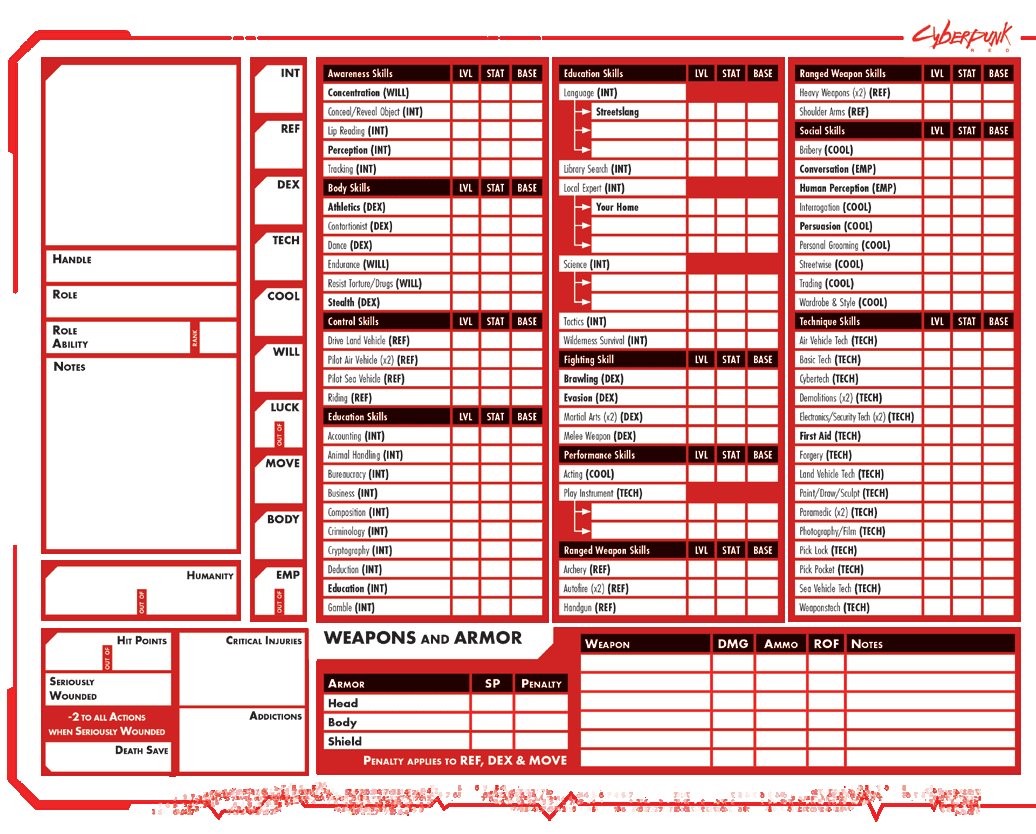
“Your character sheet is your lifeline. Know it, update it, or die.”
This guide explains how to use the Cyberpunk RED character sheet — what each field means, how to fill it in, and how to keep it updated during play.
🚀 Getting Started
Character Sheet Options
| Option | Best For | Link |
|---|---|---|
| The Red Companion | Web-based builder & manager | cyberpunkred.com |
| Standard PDF | Printable / fillable | Download |
| Lifepath PDF | More backstory space | Download |
| Edgerunner Folio | Complete tracking | Download |
| Markdown | Text editors, Notion | Download |
The Red Companion is R. Talsorian's official web app — create characters, level up, and manage your sheet in a browser. Great for online play.
📊 Understanding the Character Sheet
The character sheet follows the same steps as Character Creation. Here’s what each section means.
Step 1 — Identity & Role
| Field | What It Is |
|---|---|
| Handle | Your street name — what people call you |
| Role | Your Role (Solo, Netrunner, Fixer, etc.) |
| Role Ability | Your Role’s special ability |
| Role Rank | Your Role Ability rank (starts at 4) |
Step 2 — Primary STATs
Your 10 core stats: INT, REF, DEX, TECH, COOL, WILL, LUCK, MOVE, BODY, EMP. All must be filled in — see 02 Stats & Derived for details.
Step 3 — Derived Stats
| Field | What It Is | How to Calculate |
|---|---|---|
| Max HP | Maximum Hit Points | 10 + 5 × ⌈(BODY + WILL) ÷ 2⌉ |
| Current HP | Current HP | Track during play |
| Seriously Wounded | Wound threshold | Max HP ÷ 2 (round up) |
| Death Save | Death Save target | BODY |
| Max Luck | Maximum Luck points | LUCK stat |
| Current Luck | Current Luck | Refills each session |
| Max Humanity | Max Humanity | EMP × 10 |
| Current Humanity | Current Humanity | Track as cyberware is installed |
| Total HL | Total Humanity Loss | Sum of all cyberware HL |
Step 4 — Lifepath
Your character’s backstory: Cultural Origins, Personality & Style, Values, Family Background, Friends, Enemies, and Role-Specific Lifepath. See 03 Lifepath for the full process.
Step 5 — Skills
List every skill your character has ranks in. For each skill, record:
- Skill name and Level (ranks purchased)
- Linked STAT (determines which stat adds to rolls)
- Base = STAT + Level (this is what you add to 1d10)
See 04 Skills & Allocation for the full skill list and point costs.
Step 6 — Weapons & Armor
Fill in your starting gear from 05 Starting Gear:
- Weapons: Name, type, damage, ammo, ROF, hands
- Armor: Location (Head/Body), SP, penalty
- Ammunition: Type and quantity
Step 7 — Cyberware
Track installed cyberware with name, type, Humanity Loss (HL), and effect. When installing cyberware:
- Add to your Total HL (sum of all cyberware HL)
- Recalculate Current Humanity = Max Humanity − Total HL
- Check Current EMP = Current Humanity ÷ 10 (round down)
Progression & Economy
| Field | What It Is |
|---|---|
| Reputation | Your street rep score |
| IP Earned | Total Improvement Points earned |
| IP Spent | Total IP spent on skill upgrades |
| IP Available | IP you can still spend |
| Cash | Current Eurodollars |
🔄 During Play
After Every Session
- HP — Update for healing or damage
- Luck — Refills to max each session
- Cash — Update for income, purchases, loot
- IP — Add IP earned from session
After Combat
- Update current HP
- Note armor ablation (SP reduces by 1 per hit taken)
- Update ammo counts
After Advancement (Spending IP)
- Increase the relevant skill level
- Update IP spent and available
- If you raised a STAT, recalculate derived values (HP, Death Save, etc.)
After Installing Cyberware
- Add cyberware to your Installed list
- Update Total HL (sum of all HL costs)
- Recalculate Current Humanity = Max Humanity − Total HL
- Check current EMP = Current Humanity ÷ 10 (round down)
🎯 Quick Reference
Wound State Thresholds
For a character with 40 max HP:
- Lightly Wounded: 39–20 HP (no penalty)
- Seriously Wounded: 19–1 HP (−2 all Actions)
- Mortally Wounded: 0 or less (Death Saves!)
Death Saves
Roll 1d10 each turn at 0 HP. Must roll ≥ BODY to survive. Penalty increases by 1 each turn.
Skill Bases
| Base | Meaning |
|---|---|
| 10+ | Competent |
| 14+ | Professional |
| 18+ | Expert |
| 22+ | Legendary |
🔗 Related Topics
- Player Handbook — Player Handbook
- Character Creation — Building your character
- Pre-Made Characters — Ready-to-play ‘runners
- Skills — Full skill list